Please use the following guide to change the password for a mailbox within the Plesk control panel.
- Login to the Plesk account - it is usually best to login via our billing system at https://clients.cooini.com
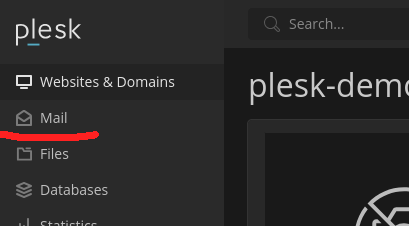
- In Plesk, Click the "Mail" menu item on the left menu
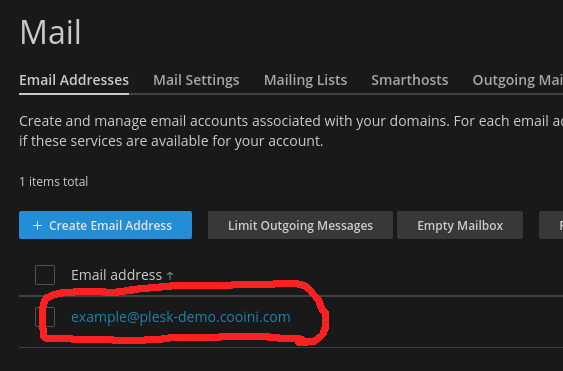
- Click the email address for the mailbox you want to change the password for
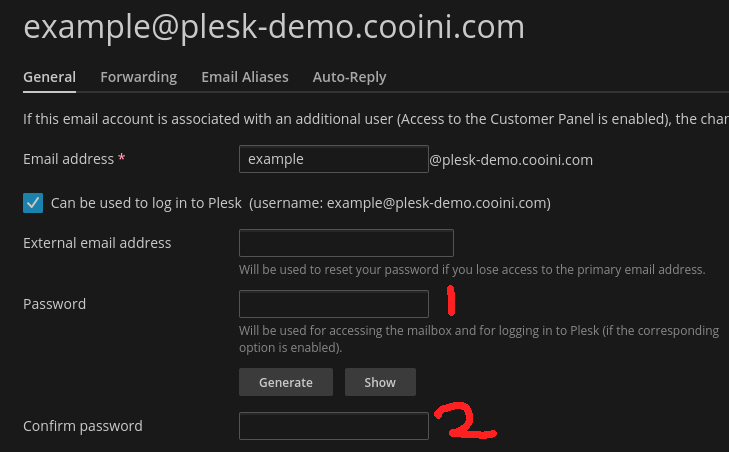
- Enter the new password in the "Password" and "Confirm Password" text fields
- Click "OK" at the bottom of the mailbox settings page to save the password
The mailbox password is now changed.
Mail clients will ask for the new password on their next mail check. You can also do a manual mail check for the mail client to prompt you immediately.
